
Tune throwing
Throw styles, per-gift overrides, hit sounds and reactions, and the panel that tells you why nothing is throwing.
The Throwing tab has three sub-tabs: Setup, Gifts and Physics. Most of the tuning sliders sit behind a single Advanced switch, which remembers whether you left it on.
If you have not set up a hitbox yet, do Throw your first gift first.
Start with a throw style
Throw style on the Physics tab sets the whole feel in one click:
| Style | Feel |
|---|---|
| Gentle | Soft, floaty arcs that settle quickly |
| Normal | Balanced throws, the default |
| Chaos | Fast, bouncy, oversized mayhem |
Gentle
Soft, floaty arcs that settle quickly
Normal
Balanced throws, the default
Chaos
Fast, bouncy, oversized mayhem
Change any slider afterwards and the picker switches to Custom. Picking a style again replaces your tuning, so export a backup first if you liked it.
The sliders worth knowing
Turn on Advanced to see all of these.
| Setting | What it changes |
|---|---|
| Gravity | 0 floats, 1 is Earth-like, 4 is a heavy thud |
| Throw speed | High values punch items across the screen, low ones give a gentle arc |
| Bounciness | 0 sticks on contact, 1 is a full elastic bounce |
| Item size | Base scale, with a small random jitter per item |
| Scale size by diamonds | Bigger gifts throw bigger items, on a log curve: about 1.6x at 100 diamonds, 2.2x at 10,000 |
| Lifetime (s) | How long items stay before fading out |
| Enable floor | Items rest or bounce at the bottom instead of falling off screen |
| Enable walls | Invisible side walls keep items in frame |
| Keep items on screen (pile up) | Items never fade. This makes Lifetime do nothing |
| Aim at the hitbox | Items arc toward the centre of the hitbox. Off gives a random diagonal throw |
| Model flinches on hit | Triggers a head bonk when an item lands |
Per-gift mappings
The Gifts tab is where a gift stops being generic. Each mapping sets a sprite, a spawn sound, a hit sound, and physics for that gift alone.
More options opens the per-gift overrides:
| Override | What it does |
|---|---|
| Throw force | How hard this gift is thrown. Off uses the scene's throw speed |
| Aim at | A named body part, Random body part, or Auto (whole model) |
| Time on screen (s) | This gift's lifetime. Off uses the scene's |
| Comes in from | Left, right, both sides, or Above (drops down) |
| Spin | 0 is no tumble, 1 is normal, 3 is a fast spin |
Every override is off by default, so a gift you have not touched behaves exactly as it did.
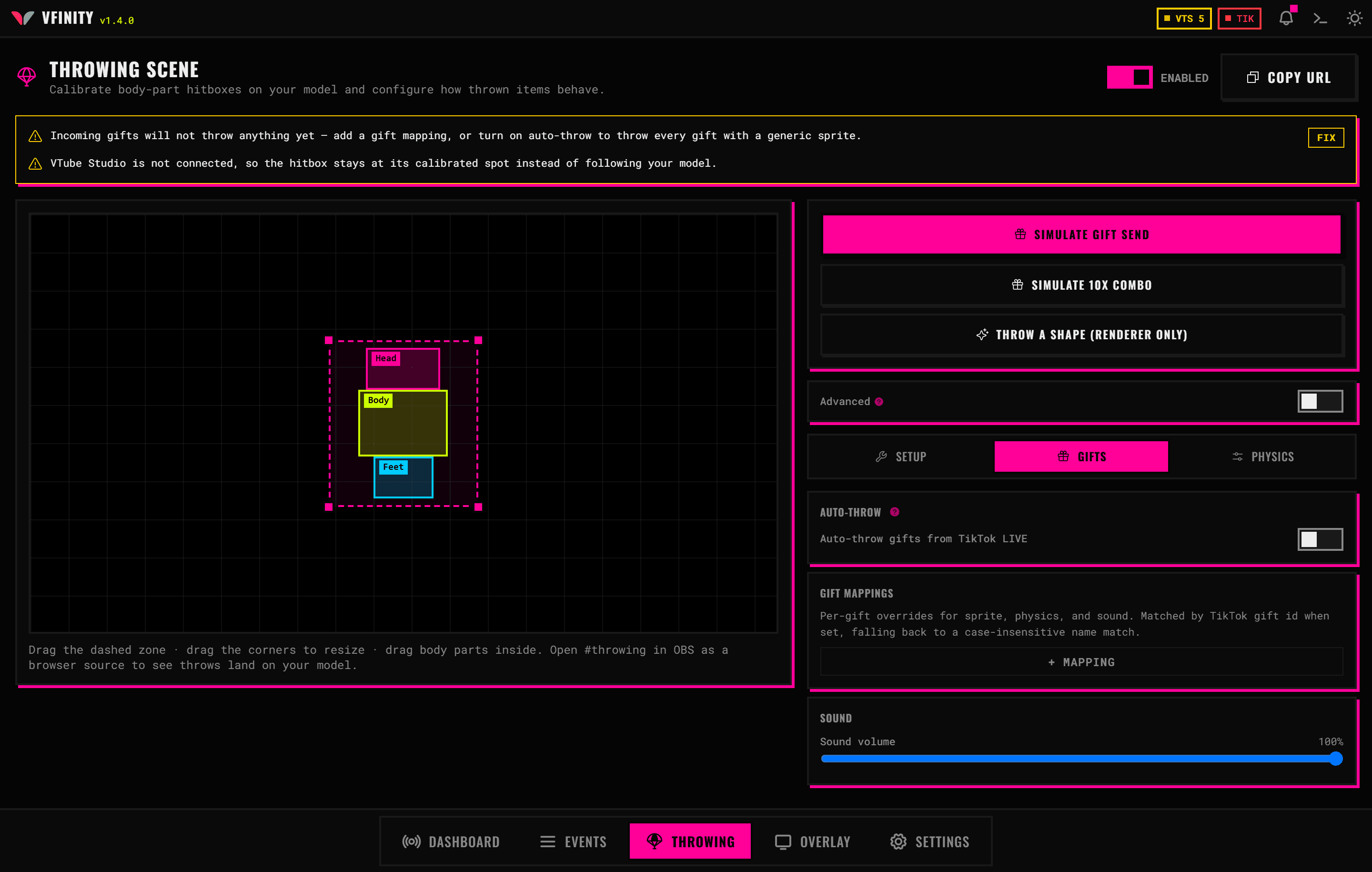
Gifts are matched by TikTok gift id when the mapping was made with the picker, and by case-insensitive name otherwise.
Which gifts throw at all
Two settings decide this, and they interact:
- Auto-throw gifts from TikTok LIVE throws every incoming gift.
- Throw unmapped gifts too (generic sprite) decides what happens to gifts that match none of your mappings. With it off, only mapped gifts throw.
Minimum diamonds to throw applies to your gift mappings as well as to auto-thrown gifts. Most gifts are worth 1 to 10 diamonds, so a minimum of 50 blocks nearly everything, quietly. A Rose is one diamond.
Body parts and reactions
Each body part on the Setup tab carries its own:
- Hit sound URL, played when something lands on it
- Reaction on hit, which fires a VTS hotkey, switches a VFX preset, or moves the model. This needs VTube Studio connected
- Cooldown (ms), the minimum gap between consecutive reactions for that part, so one combo cannot spam the same hotkey
- Face follow strength, how tightly the box tracks VTube Studio face tracking: 0 is static, 1 matches the face, 2 exaggerates it
Follow the VTube model makes the whole hitbox track your model's position. It needs VTube Studio connected; without it the hitbox stays at its calibrated spot.
When nothing throws
Needs attention at the top of the Throwing tab lists every reason nothing is being thrown, each with a Fix button. It catches:
- The scene being off
- No OBS browser source receiving throws
- A diamond minimum blocking everything
- A gift aimed at a body part you deleted
- Gift mappings narrowing throws to themselves
- Sound volume at zero
- Keep items on screen making the lifetime setting pointless
- A gift spawning more items than the burst cap allows
- TikTok LIVE not being connected
Read it before changing anything else.